Search for "asset lifecycle management" and you'll find guides about laptops, licenses and server racks. That's ITAM — useful if you run an IT department, useless if you're a dealer with 800 autoclaves, compressors and imaging units installed across 200 customer sites. This guide covers what asset lifecycle management means for medical and dental equipment dealers in 2026: the lifecycle stages that matter, the data you need per asset, and how each transition becomes a service contract or a replacement sale instead of a silent loss.
What asset lifecycle management means for a dealer
Asset lifecycle management (ALM) is the practice of tracking every asset through its full life and acting on the transitions. The classic enterprise version runs plan → procure → deploy → maintain → retire, from the owner's point of view.
A dealer sees the same machines from the other side of the table. You sold the asset; the customer owns it; you own the lifecycle. Your version of ALM looks like this:
- Install — the machine goes live at the customer site. Serial number, install date, OEM warranty period recorded.
- In warranty — covered by the OEM (or an extended warranty you sold). Service events logged against the serial.
- Warranty expiring — the 90-day window where an extension or a service contract is an easy, natural conversation.
- Out of warranty — uncovered. Either you re-cover it with a contract, or every breakdown becomes an awkward time-and-materials negotiation.
- Approaching end-of-life — within roughly a year of the end of its useful life. Replacement planning starts here, while the machine still has trade-in value and the customer can budget.
- End of life — past its useful life. Repair costs climb, parts get scarce, compliance risk grows. The replacement quote should already be on the table.
Each transition is a revenue moment with an expiry date. Miss the warranty-expiring window and the contract conversation gets harder. Miss the approaching-EOL window and the replacement sale goes to whichever competitor calls first.
Why ITAM and CMMS tools don't fit
| ITAM / enterprise ALM | CMMS | Dealer ALM | |
|---|---|---|---|
| Asset owner | Your company | Your company | Your customers |
| Core object | Device + license | Asset + work order | Customer + installed machine + warranty clock |
| Lifecycle trigger | Depreciation schedule | Failure / PM calendar | Warranty + useful-life dates per serial |
| End of lifecycle | Disposal ticket | Asset archived | Replacement sale (the lifecycle restarts) |
| Who acts on it | IT ops | Maintenance team | Your service + sales team |
That last row is the one that costs money. In ServiceNow or IBM Maximo, "end of life" produces a disposal workflow. For a dealer, end of life should produce a quote — and a new install that restarts the warranty clock and the whole compounding loop. (For why generic maintenance tools miss the dealer shape entirely, see our CMMS for equipment dealers breakdown.)
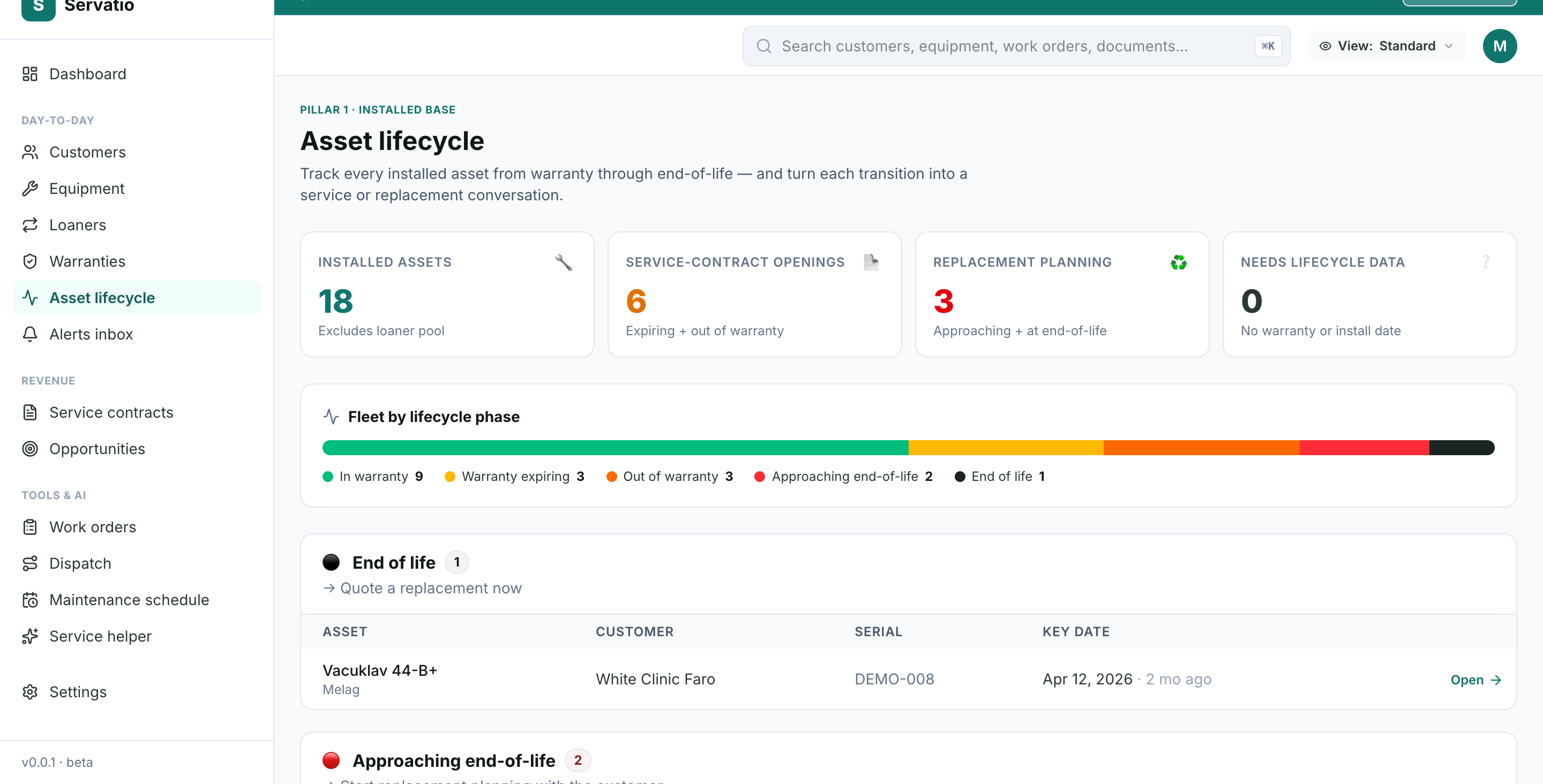
Servatio's asset lifecycle view stages every installed machine — in warranty, expiring, out of warranty, approaching EOL, end of life — and tells you the next move for each.
Start free trialThe data model: what you need per asset
Dealer-grade lifecycle tracking needs five dates and one reference per machine:
- Install date — the anchor everything else derives from.
- Warranty start / end — OEM coverage window.
- Extended warranty end — if you sold one, it supersedes the OEM date.
- Useful-life end — when the machine is past its design life.
- Model reference — which links to the OEM's published warranty period and useful life for that model.
The trick: deriving end-of-life when nobody recorded it
Almost no dealer has "useful life end" in their Excel sheet. But you almost always have the install date, and the OEM's expected useful life per model is public knowledge — an autoclave chamber is typically rated for 8-12 years, a compressor 10-15, an intraoral scanner 5-7. Software should derive the EOL estimate as install date + model useful life automatically. Servatio pre-loads useful-life defaults across 168+ models from Melag, Cattani, Dürr Dental, Planmeca, Dentsply Sirona and others, so the lifecycle picture appears the day you import your installed base — no data archaeology required.
The fleet view: manage phases, not spreadsheet rows
Once every asset has a lifecycle stage, the management question changes from "what's the warranty date on this serial?" to "how is my fleet distributed across phases, and where is the money?" A good lifecycle dashboard answers four questions at a glance:
- How many assets sit in each phase? A healthy installed base is mostly green (in warranty / under contract). A wall of "out of warranty" is uncaptured service revenue.
- Where are my service-contract openings? Everything in warranty expiring + out of warranty — each one a concrete conversation with a deadline. (The conversion playbook is in our warranty leakage guide.)
- Who needs replacement planning? Everything approaching EOL — start the conversation a year out, not the week the machine dies mid-procedure.
- Which assets have no lifecycle data at all? Machines with no warranty or install date are invisible risks — flag and fix them.
Lifecycle transitions → commercial plays
| Transition | Window | The play |
|---|---|---|
| In warranty → expiring | ~90 days before warranty end | Extended warranty or service contract offer, pre-drafted and sent by the account owner |
| Expiring → out of warranty | Day after expiry | Re-coverage pitch: contract priced against realistic time-and-materials risk |
| Out of warranty → approaching EOL | ~12 months before useful-life end | Replacement roadmap conversation; trade-in valuation while residual value exists |
| Approaching EOL → end of life | At useful-life end | Replacement quote on the table; substitution unit ready for the swap window |
| End of life → replaced | Install of the new unit | New warranty clock starts — the lifecycle (and the revenue loop) restarts |
This is the compounding logic of a dealer's installed base: every machine you replace re-enters the top of the lifecycle with a fresh warranty, a fresh contract opportunity, and another 8-12 years of service relationship. Dealers who manage lifecycle transitions deliberately grow recurring revenue every year on the same customer base.
Platform comparison: where the ALM tools land
| Tool | Built for | Strength | Weakness for dealers |
|---|---|---|---|
| Servatio | Medical/dental equipment dealers | Lifecycle phases per installed asset, derived EOL from OEM library, warranty + contract pipelines attached | Newer; small customer base in 2026 |
| ServiceNow (HAM/ITAM) | Enterprise IT fleets | Deep workflow engine | IT-asset model; six-figure cost; no dealer/customer concept |
| IBM Maximo | Enterprise EAM (industrial) | Heavy-industry asset depth | Owner-side EAM; major implementation; overkill for a dealer |
| Asset Panda | Generic asset tracking | Flexible fields, barcode/QR | Tracking, not lifecycle revenue; no warranty pipeline or contracts |
| EZOfficeInventory | Internal equipment checkout | Simple check-in/out | Single-org model; no installed-base-at-customers concept |
| UpKeep / MaintainX / Limble | In-house maintenance | Mobile work orders | Lifecycle = a date field; no phase view, no replacement planning |
| Excel | Everyone, eventually | Free | No derived EOL, no alerts — lifecycle transitions pass silently |
What does asset lifecycle management software cost?
- Enterprise ALM/EAM (ServiceNow, Maximo) — five to six figures per year plus months of implementation. Built for asset owners with thousands of internal assets.
- Generic asset trackers (Asset Panda, EZOfficeInventory) — $40-$200/month. Affordable, but they track location and custody, not lifecycle revenue.
- Vertical dealer platforms (Servatio) — $199-$1,499+/month per organization, with lifecycle staging, warranty pipeline, service contracts and work orders in one model.
Frequently asked questions
What is asset lifecycle management for equipment dealers?
Tracking every machine you've sold through its full life — install, warranty, expiry, contract coverage, approaching end-of-life, replacement — so each transition triggers the right commercial action instead of passing silently.
How is dealer ALM different from IT asset management?
ITAM manages laptops and licenses your own company owns. Dealer ALM manages serialized medical equipment your customers own — warranty status, service contracts, OEM useful-life data and the replacement sale are the core of the model, not metadata fields.
How do you estimate end-of-life when it was never recorded?
Derive it: install date + the OEM's published useful life for that model. Servatio pre-loads useful-life defaults for 168+ models, so every imported asset gets an EOL estimate even when the original spreadsheet only had an install date.
Where do I start if my installed base lives in Excel?
Import it. Servatio's AI importer maps your columns (serial, customer, install date, warranty) automatically, attaches OEM defaults per model, and the fleet lifecycle view populates immediately — typically inside an afternoon, not a quarter.
The bottom line
Your installed base already has a lifecycle — every machine is somewhere between "installed yesterday" and "should have been replaced two years ago". The only question is whether you can see it. Dealers who manage the phases deliberately convert warranty expirations into contracts and EOL machines into replacement sales; dealers who don't, find out about lifecycle transitions when a competitor's van is parked outside their customer's clinic.
For a dealer with 500 installed machines on a ~10-year average life, roughly 50 machines hit end-of-life every year. At typical equipment prices, that's a seven-figure replacement pipeline — visible a year in advance to whoever is watching the lifecycle, and invisible to whoever is watching a spreadsheet.