Most work order software was designed for maintenance teams fixing their own machines in their own building. If you're a dealer servicing equipment that lives at customer sites, your work order is a different animal: it carries a quote, it needs the customer's sign-off, and it ends in an invoice with a margin. This guide covers what work order management software needs to do for equipment dealers in 2026 — and where the popular tools fall short.
What work order software actually does
At its core, work order software turns a service request — "the autoclave is throwing error E12" — into a tracked unit of work with a status, an owner, parts and labour lines, and a paper trail. Every tool on the market does that much.
The differences appear the moment the work is billable to someone else. For an in-house maintenance team, a work order is a cost to be minimized. For a medical or dental equipment dealer, a work order is a revenue document: it gets quoted, approved by the customer, executed, and invoiced. That single difference changes nearly every feature that matters.
In-house work orders vs. dealer work orders
| In-house CMMS work order | Dealer work order | |
|---|---|---|
| Who owns the asset | You do | Your customer does |
| Approval step | Internal supervisor, maybe | Customer must approve the quote before work starts |
| Money model | Cost center | Cost, price and margin per service line |
| Intake | Operator walks over | Customer reports remotely — portal, phone, QR scan on the machine |
| Downtime answer | Wait for repair | Keep the clinic running on a substitution unit (we build Loaners.app for that) |
| Context that matters | Asset history | Warranty status, service contract coverage, customer relationship |
This is why dealers who buy a generic CMMS (UpKeep, MaintainX, Limble — see our full breakdown of why generic CMMS fails dealers) end up running the quoting and approval loop over email and the margin math in Excel. The work order tool only ever sees the middle of the story.
The work order lifecycle that closes revenue
A dealer-grade work order pipeline looks like a sales pipeline, because it partly is one:
- Intake. The request arrives — from a customer portal, a phone call, a QR code scanned on the machine itself, or auto-generated by a preventive maintenance schedule. It lands in triage with the equipment's identity, warranty status and contract coverage already attached.
- Triage & diagnosis. A technician reviews symptoms and service history. In Servatio, an AI assistant reads the machine's model, error patterns and past interventions and proposes likely causes before anyone opens a toolbox.
- Quote. Service lines are added with cost and price per line — labour, parts, travel. The system shows the margin as you build it.
- Customer approval. The customer gets a secure link and approves or rejects in one click — no login, no PDF attachments, no "did you see my email?". The work order advances automatically.
- Execution. Scheduled, assigned, checklist completed on site. If the machine needs to come into the workshop, pair the repair with a substitution unit — loaner fleets are a product of their own, which is why we build Loaners.app alongside Servatio.
- Completion & billing. The work order closes with real costs vs. quoted, the margin is recorded, and the service history of that serial number grows by one entry — feeding the next renewal or replacement conversation.
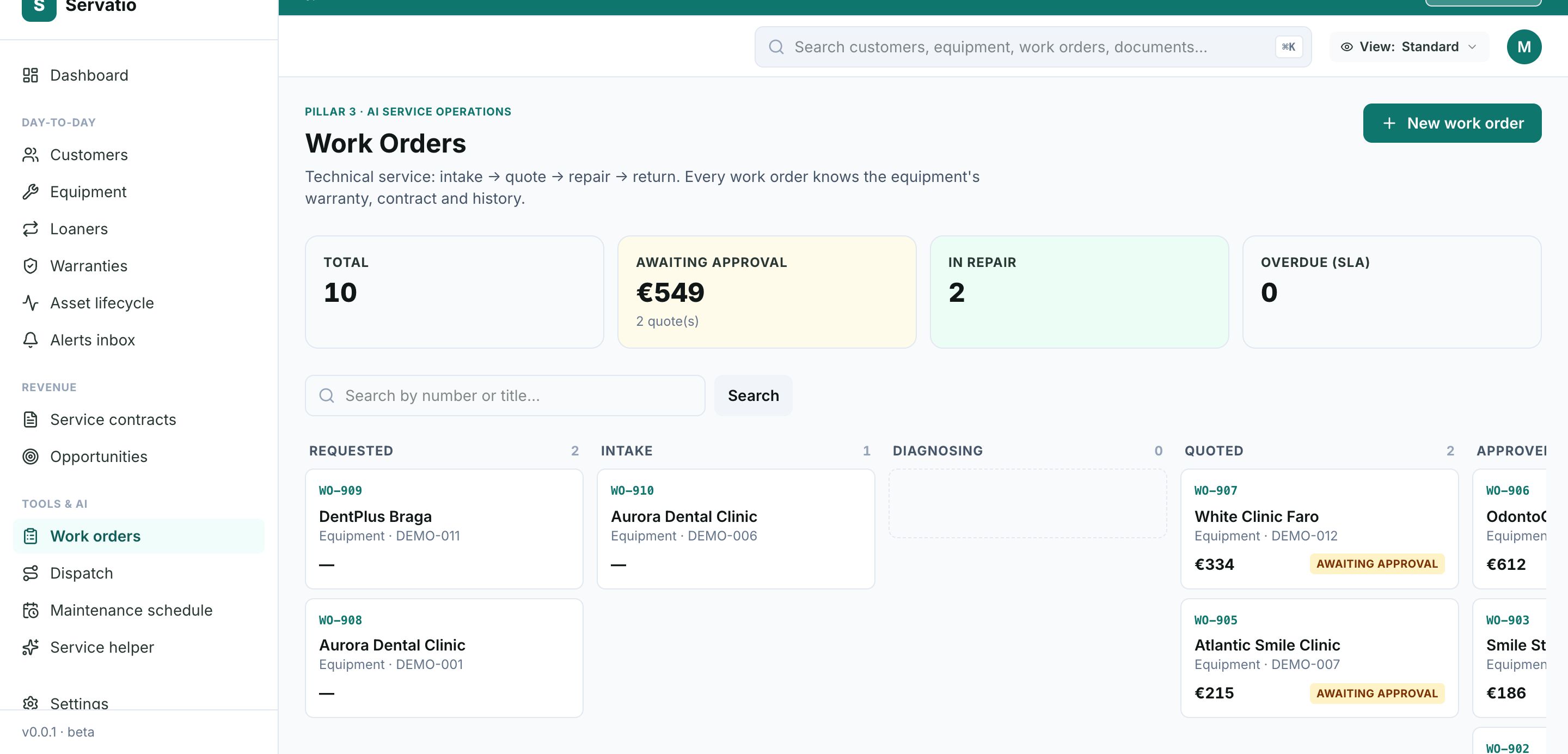
Servatio's work orders run a full state machine — triage, quote, customer approval, execution, completion — with margins on every line and AI diagnosis built in.
Start free trialThe 8 features that actually matter for dealers
1. Customer quote approval without a login
The single biggest cycle-time killer in dealer service is waiting for quote approval. The fix is a secure, tokenized link the customer can open on their phone and approve in one tap. If your work order software makes the customer create an account to approve a €400 repair, the approval happens over email instead — outside the system, invisible to reporting.
2. Cost, price and margin per service line
Each line on the work order — labour hour, replacement part, travel — should carry both what it costs you and what you charge. Per-line margin rolls up to per-work-order margin, then to per-customer and per-equipment-category profitability. This is how you discover that compressor callouts are subsidising your imaging business, or vice versa.
3. Intake from a customer portal (and a QR code on the machine)
Customers should be able to report a fault without calling. A portal page — or a QR sticker on the machine that opens it — captures the symptom, urgency and photos, and creates the work order in triage with the right serial number already attached. No transcription, no "which autoclave was it again?".
4. AI-assisted diagnosis
By 2026 this is table stakes for new tools: the system reads the model, the reported symptoms and that machine's service history, and proposes likely causes and first checks. It doesn't replace the technician — it saves the 20 minutes of looking up what error E12 means on that specific Melag or Cattani unit, and it catches repeat-failure patterns humans miss.
5. Preventive maintenance that generates work orders automatically
PM schedules — calendar-based, hours-based or cycle-based depending on the equipment — should create work orders through the same pipeline as corrective repairs. If preventive work lives in a separate module with separate reporting, your technicians' workload and your service revenue picture are both split in two. (More in our preventive maintenance software guide.)
6. Status updates the clinic actually receives
Every transition the customer cares about — quote approved, repair started, equipment ready — should trigger a short, clear update in the customer's language, written automatically. In Servatio these are AI-drafted (EN/PT/ES by customer country) with safe fallbacks, so the clinic never wonders what's happening and your office never types another "just to update you" email.
7. Warranty and contract context on every work order
Before quoting, the technician needs one glance to answer: is this machine under OEM warranty, under an extended warranty, under a service contract — or billable? Getting this wrong in either direction costs money: free work you should have billed, or billed work that was covered and now needs a credit note. (This is where work order software meets warranty management.)
8. An audit trail that survives an inspection
Under EU MDR and ISO 13485 regimes, "who did what to this device and when" is not optional. Every stage change, approval and edit on the work order should be logged immutably — not reconstructed from email threads when the auditor asks.
Platform comparison: 9 tools dealers actually consider
| Tool | Built for | Strength | Weakness for dealers |
|---|---|---|---|
| Servatio | Medical/dental equipment dealers | Quote→approval→payment→margin pipeline, AI diagnosis, automatic status emails, warranty context built in | Newer; small customer base in 2026 |
| Salesforce Field Service | Enterprise field service | Deep customization, scheduling engine | $$$, months of implementation, needs an admin (full comparison) |
| UpKeep | In-house maintenance | Easy mobile work orders | No customer approval loop, no per-line margin (comparison) |
| MaintainX | In-house maintenance | Best-in-class mobile UX | Single-org model; customers aren't first-class (comparison) |
| Limble | Small maintenance teams | Affordable, simple | Same in-house shape (comparison) |
| ServiceTrade | Commercial contractors (HVAC, fire) | Strong quote/approval flow | No medical/dental equipment model, no OEM library, no installed-base records |
| Jobber | Home-service businesses | Simple quoting + invoicing | Built for lawns and plumbing, not serialized regulated equipment |
| FieldEdge | HVAC contractors | Dispatch + QuickBooks sync | Wrong vertical; no warranty/installed-base model |
| Excel + email | Everyone, eventually | Free, familiar | Quotes approved in inboxes, margins computed quarterly, zero audit trail |
What does work order software cost?
- Horizontal CMMS (UpKeep, MaintainX, Limble) — roughly $30-$80 per user/month. Cheap, but you'll run approvals and margins outside the tool.
- Enterprise field service (Salesforce FS, ServiceMax) — five to six figures per year plus implementation. Built for 200-technician fleets.
- Vertical dealer platforms (Servatio) — $199-$1,499+/month per organization depending on installed-base size, with the quote/approval/margin loop included rather than bolted on.
Frequently asked questions
What is the difference between work order software and a CMMS?
A CMMS manages your own assets in your own facility. Dealer work order software manages service you perform on customers' equipment — so the work order carries a quote, a customer approval step, warranty context and a margin, not just a task checklist.
Can customers approve quotes without logging in?
In Servatio, yes. The customer receives a secure portal link and approves or rejects the quote in one click — no account, no password. The work order advances automatically on approval, and the decision is logged for audit.
Does work order software track profitability?
Generic tools usually track time and parts as costs. Dealer-grade software tracks cost, price and margin per service line, rolled up per work order, per customer, and per equipment category — so pricing decisions stop being guesses.
Can preventive maintenance generate work orders automatically?
Yes — in Servatio, PM schedules (calendar, running-hours or cycle-count based) auto-generate work orders through the same pipeline as corrective repairs, with the same approval and margin model.
The bottom line
If your work orders end in an invoice to a customer, don't buy software built for work orders that end in a cost report. The approval loop, the per-line margin, the automatic status updates and the warranty context aren't nice-to-haves — they're the difference between a service department that knows its numbers and one that discovers them at year-end.
A dealer running 50-200 work orders a month typically loses more to slow quote approvals and unbilled covered-work confusion than the software costs. Fix the pipeline, and the work orders start paying for the tool.