Most service dispatch software was built to route plumbing vans: jobs come in, trucks go out, optimize the miles. A medical or dental equipment dealer dispatches against a different reality — every job sits on a warranty or a quote that may not be approved yet, the machine might need a loaner while it's in the workshop, and the technician you send needs the unit's service history, not just an address. Here's what dispatch needs to look like for an equipment service team, and where the well-known tools land.
What dispatch actually has to answer
Strip away the routing maps and a dispatch board answers three questions, every morning, for the service manager:
- What's overdue? Jobs scheduled in the past and still open — the list that erodes customer trust fastest, and the one a spreadsheet never volunteers.
- What's happening this week? Today and the next days, job by job, with a technician's name on each.
- What's waiting with no date? The unscheduled backlog — every ticket that arrived and hasn't been promised to anyone yet.
In Servatio this is literally the layout of the dispatch board: an overdue lane first, a 7-day week grid with today highlighted, a "scheduled later" shelf, and the unscheduled backlog at the bottom. Each card carries the work order number, stage, customer — and inline controls to assign the technician and set the date without leaving the board.
Why dealer dispatch is different from truck dispatch
| Home-services dispatch | Equipment dealer dispatch | |
|---|---|---|
| The job | An address + a time window | A serial number + its warranty, contract and history |
| The gate | Dispatch when a slot opens | Dispatch when the quote is approved — work before approval is work you may not bill |
| Downtime | Customer waits | A loaner unit may need to ship with the technician |
| Job sources | Phone calls | Customer portal, QR scan at the machine, preventive maintenance auto-generation |
| Optimization goal | Miles per truck | Promise dates kept; covered work routed correctly |
The approval gate is the one that costs real money. A dealer-grade dispatch board doesn't float free — it sits on the work order pipeline, so every card shows its stage (requested, diagnosing, quoted, approved, in repair, ready) and the manager can see at a glance which jobs are actually dispatchable versus still waiting on the customer's one-click approval.
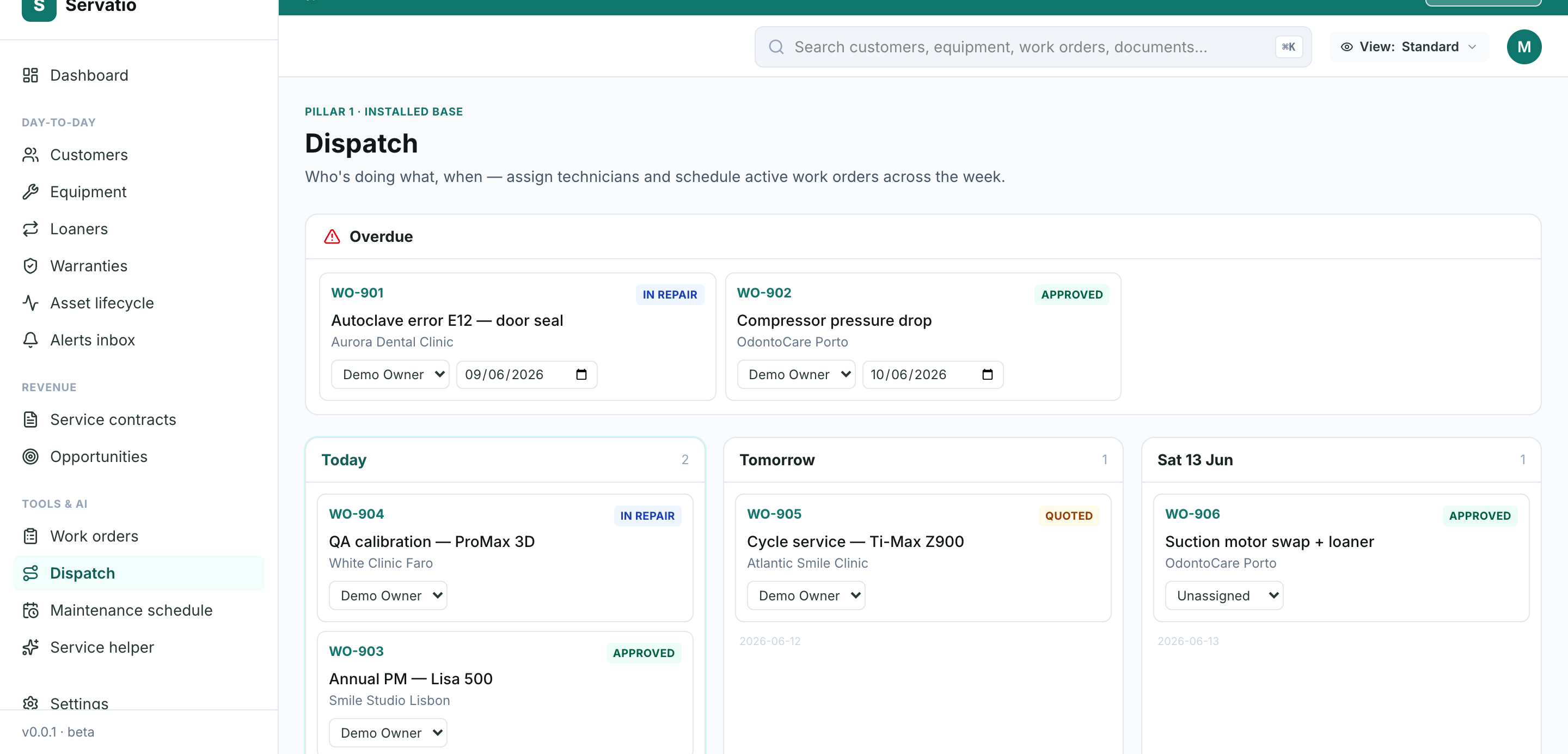
Overdue first, the week laid out, the backlog visible, a technician on every card. Servatio's dispatch board runs on the same work orders your portal, QR codes and PM schedules already create.
Start free trialThe features that matter (and the ones that don't yet)
1. Overdue surfaced automatically
The board's first lane should be the jobs whose scheduled date has passed. Not a filter someone remembers to run — the default view. This single habit is most of the difference between "we're slammed" and "we know exactly what slipped".
2. Assignment where the work lives
Assigning a technician should be a dropdown on the card, not a form three screens away. Same for the date. Friction here is why whiteboards survive — the tool has to be faster than the marker.
3. Stage-aware cards
Dispatch decisions depend on pipeline state: a quoted job waiting on approval shouldn't get a van booked; an approved job should never sit unscheduled. Stage on every card, color-coded.
4. Jobs that create themselves
Portal tickets, QR-code fault reports at the machine, and auto-generated preventive maintenance all land in the same backlog — so dispatch covers 100% of the work, not just what was phoned in.
5. What you can skip at dealer scale
GPS truck tracking, drive-time optimization, shift capacity engines — that's enterprise field-service machinery (Salesforce FS, ServiceMax) priced and built for hundreds of technicians. A dealer running 2-15 technicians needs the week visible and the backlog empty, not a routing algorithm.
Platform comparison: 8 tools dealers actually consider
| Tool | Built for | Strength | Weakness for dealers |
|---|---|---|---|
| Servatio | Medical/dental equipment dealers | Dispatch board on a quote-gated work order pipeline; portal/QR/PM intake; payment-aware stages | No GPS routing or capacity planning (deliberate at dealer scale) |
| Salesforce Field Service | Enterprise field service | Scheduling engine, routing, capacity | $$$ + months of setup; needs an admin (comparison) |
| ServiceTrade | Commercial contractors | Strong dispatch + quote flow | No medical equipment model, warranty or installed-base context |
| Housecall Pro | Home services | Easy scheduling + payments | Consumer-job shape; no serialized equipment or compliance |
| FieldEdge | HVAC | Dispatch board + QuickBooks | Wrong vertical; no installed-base concept |
| Jobber | Home services | Simple and cheap | Same consumer shape |
| UpKeep / MaintainX | In-house maintenance | Mobile work orders | No customer/dispatch concept — single-org tools (comparison) |
| Whiteboard + phone | Everyone, eventually | Zero learning curve | No overdue lane, no history, erased every Friday |
Frequently asked questions
What does service dispatch software do?
It answers "who is doing what, when": active work orders organized by day, overdue surfaced first, an unscheduled backlog, and per-job technician assignment and scheduling.
Why shouldn't a job be dispatched before quote approval?
Work performed before the customer approves is work you may never bill. Dealer-grade dispatch sits on the work order pipeline, so the approval stage gates execution and the board shows it.
Does Servatio do GPS routing and capacity planning?
No — deliberately. Those are enterprise features for 100+ technician fleets. Servatio's board targets dealer-sized teams: week view, overdue lane, backlog, inline assignment.
Where do dispatched jobs come from?
Portal tickets, QR fault reports at the machine, manual work orders and auto-generated preventive maintenance — one pipeline, one board.
The bottom line
If your dispatch problem is "200 trucks, minimize miles", buy the enterprise engine. If it's "12 technicians, 60 open jobs, three different intake channels and a manager doing triage from memory" — you need the week on one screen, sitting on the same pipeline that holds your quotes, warranties and equipment history. That's the dealer shape, and it's the one generic dispatch tools don't model.